

Import test cases
Many tests repeat the same steps, such as logging in. Instead of recording them again, build them once and import them wherever you need them. Because the steps are shared, a change to the imported test case applies to every test that imports it.
One reusable test case can serve your regression suites and your synthetic monitoring tests, so you don’t build separate tests for each purpose.
Import a test case
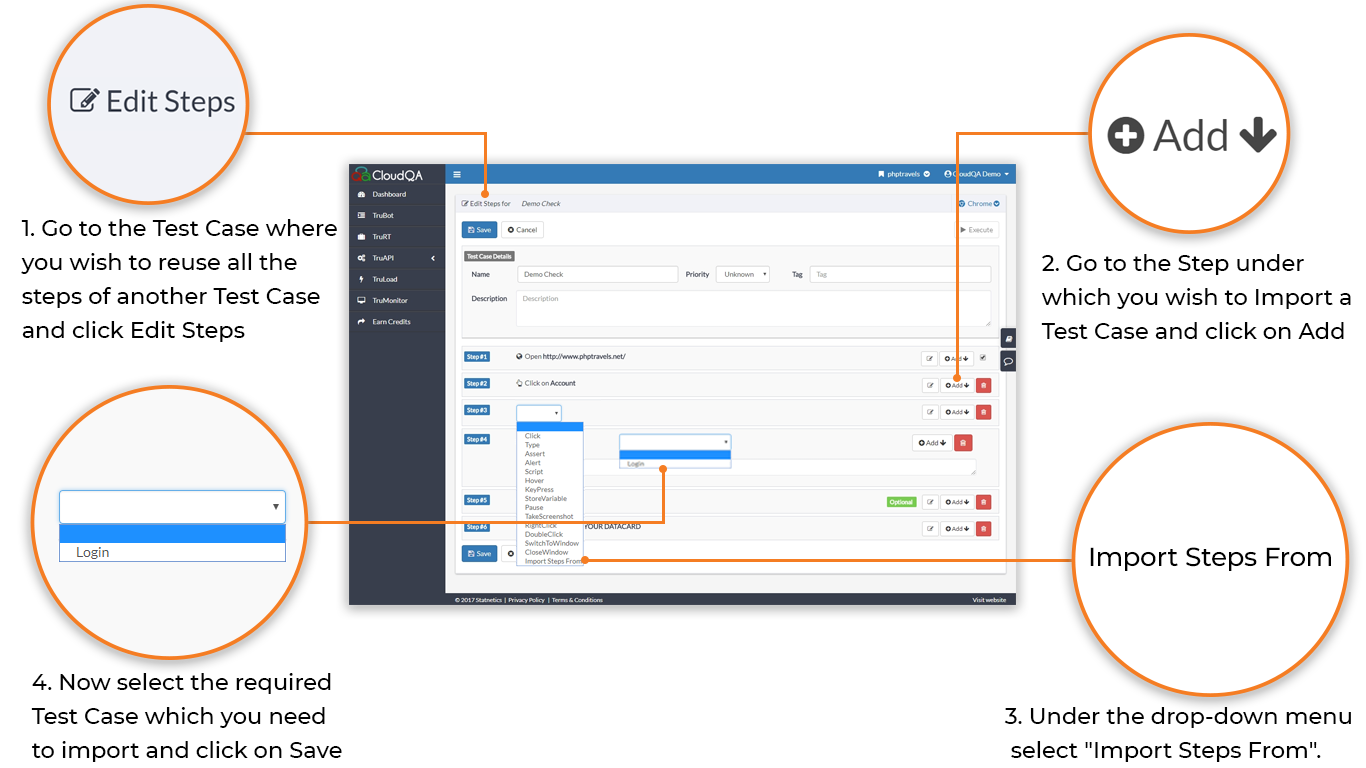
Section titled “Import a test case”- Open the test case that should reuse steps and select Edit Steps.
- Go to the step you want to import below, and select Add.
- Choose Import Steps From in the dropdown.
- Select the test case to import and save.
To make a reusable test from steps you already have, see Create a reusable test case.
Rules and limits
Section titled “Rules and limits”- You can import any test case except the one you are editing.
- Imports can be nested up to 5 levels deep, for example A imports B, B imports C, and so on.
- The open URL step of an imported test case isn’t imported, and you can only import after the open URL step.
- A test case can’t import itself, directly or indirectly. A imports B and B imports A is a circular reference.
Errors you may see
Section titled “Errors you may see”| Error | Cause |
|---|---|
Exceeded import steps nesting limit of 5 |
Imports are nested more than five levels deep, or form a circular reference. |
Import steps failed as the referenced test case was not found |
The imported test case was deleted. |