

Azure DevOps
Azure DevOps offers version control, project management, automated builds, testing and release management. Connect it to CloudQA to run CloudQA test suites in your CI/CD pipelines. See CI/CD integrations for the variables.
Before you start
Section titled “Before you start”-
API key. In CloudQA, open My Account.

-
Test suite ID. In CloudQA, open Test Suites, select the three dots in the Actions column and choose Details.
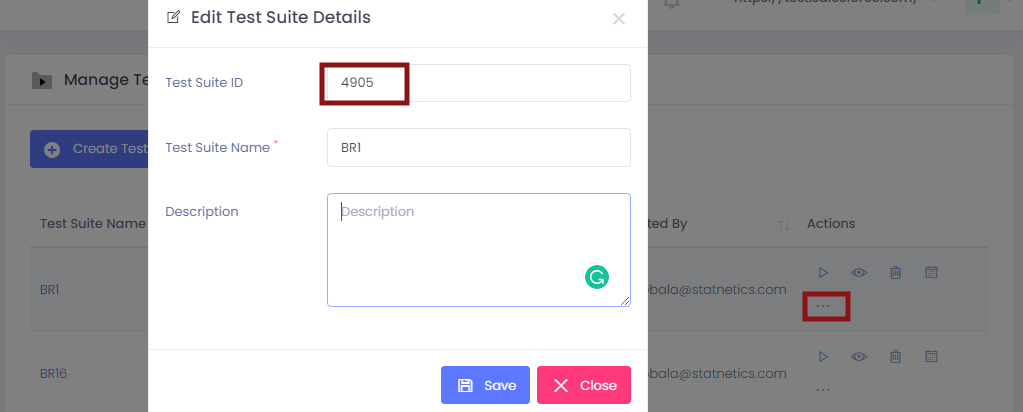
Set up the pipeline
Section titled “Set up the pipeline”-
Log in to Microsoft Azure.
-
Create a pipeline, or update an existing one.
-
Select Variables and add
CLOUDQA_API_KEY,CLOUDQA_SUITE_ID,CLOUDQA_BROWSER,CLOUDQA_BASE_URLandRUN_SEQUENTIALLY. Mark the API key as secret. -
Add these steps to the pipeline:
steps:- task: Bash@3displayName: Download the CloudQA scriptinputs:targetType: inlinescript: curl -O https://doc.cloudqa.io/files/cloudqa-bash.sh- task: Bash@3displayName: Run the CloudQA test suiteinputs:filePath: cloudqa-bash.shenv:CLOUDQA_API_KEY: $(CLOUDQA_API_KEY) -
Save and run the pipeline.
The first step downloads the CloudQA script. The second runs it. The env entry passes your secret API key to the script, because Azure doesn’t expose secret variables to scripts automatically.