

GitHub
Run a CloudQA test suite on every push or pull request with GitHub Actions. See CI/CD integrations for the variables and what you need first.
Add the secrets
Section titled “Add the secrets”In your repository, open Settings, then Secrets and variables, then Actions, and add:
- A secret named
CLOUDQA_API_KEYwith your API key. - A secret or variable named
CLOUDQA_SUITE_IDwith your test suite ID.
Add the workflow
Section titled “Add the workflow”Create .github/workflows/cloudqa.yml:
name: CloudQA tests
on:  push:    branches: [main]  pull_request:
jobs:  cloudqa:    runs-on: ubuntu-latest    steps:      - name: Install jq        run: sudo apt-get update && sudo apt-get install -y jq
      - name: Run CloudQA test suite        env:          CLOUDQA_API_KEY: ${{ secrets.CLOUDQA_API_KEY }}          CLOUDQA_SUITE_ID: ${{ secrets.CLOUDQA_SUITE_ID }}          # Optional settings          CLOUDQA_BASE_URL: https://example.com          CLOUDQA_BROWSER: Chrome          CLOUDQA_BUILD_TAG: ${{ github.run_number }}          CLOUDQA_SEQUENTIAL_EXECUTION: "false"          CLOUDQA_VARIABLES: var1=val1,var2=val2        run: |          curl -O https://doc.cloudqa.io/files/cloudqa-bash.sh          bash cloudqa-bash.sh
The job log shows the suite’s status, which is checked every 10 seconds.
Add a status badge to your README
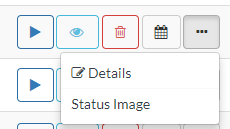
Section titled “Add a status badge to your README”- Get the status image URL. Open Test Suites, select the more-options button in the Actions column and choose Status Image. The URL appears in a green message box.
- Get the test suite ID. In the same menu, choose Details.
Add the badge to your README.md:
[](https://app.cloudqa.io/Recoder/TestSuitesSummary/<test suite ID>)