

AWS CodePipeline
AWS CodePipeline is a fully managed continuous delivery service that runs the build, test and deploy phases of your release process on every code change. You can trigger CloudQA tests from inside it. See CI/CD integrations for the variables.
Part 1: Create a CodeBuild project
Section titled “Part 1: Create a CodeBuild project”-
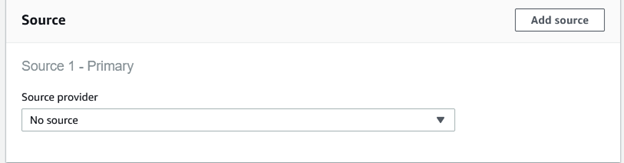
In AWS CodeBuild, create a new project with these settings:
- Source: No Source
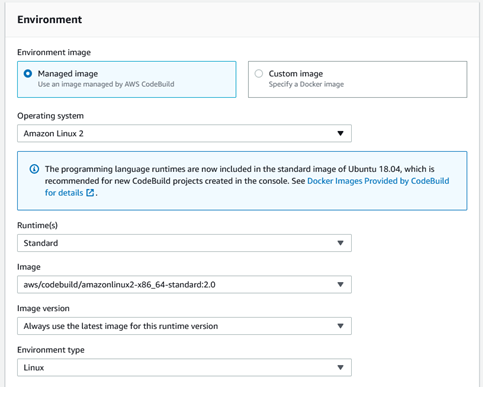
- Environment: Managed image
- Operating system: Amazon Linux 2
- Runtime: Standard
- Image:
aws/codebuild/amazonlinux2-x86_64-standard:2.0, using the latest image for that runtime - Environment type: Linux
- Service role: create a new role, or choose one that has CodeBuild and CodePipeline permissions
-
In the Buildspec section, switch to the editor and paste this:
version: 0.2phases:install:commands:- yum install -y jqpre_build:commands:- curl -O https://doc.cloudqa.io/files/cloudqa-bash.shbuild:commands:- bash cloudqa-bash.sh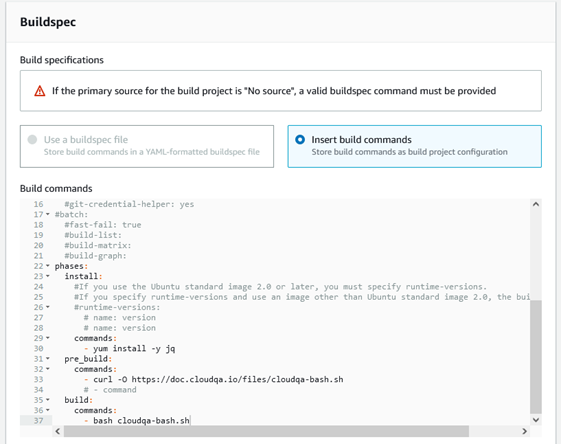
-
Create the build project.
Part 2: Add a test stage to your pipeline
Section titled “Part 2: Add a test stage to your pipeline”-
Open your pipeline and select Edit.
-
Add a stage named
Web-Testing, then add an action group to it. -
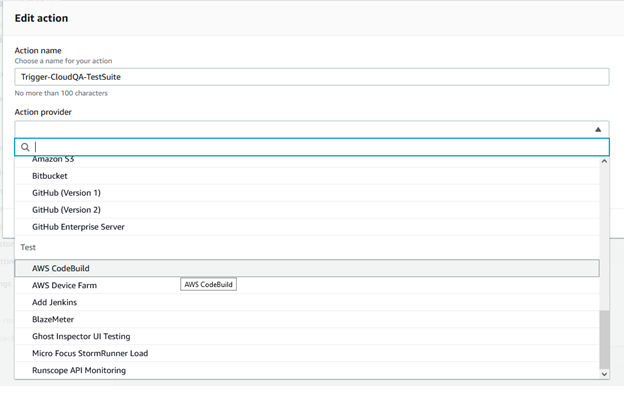
Name the action
Trigger-CloudQA-TestSuite. -
Under Test, set the action provider to AWS CodeBuild.
-
Set the input artifact to
BuildArtifactand choose the CodeBuild project you created.
-
Add the environment variables the suite needs:
CLOUDQA_SUITE_ID: in CloudQA, open Test Suites, select the more-options menu in the Actions column and choose Details.CLOUDQA_API_KEY: find it on the My Account page in CloudQA.
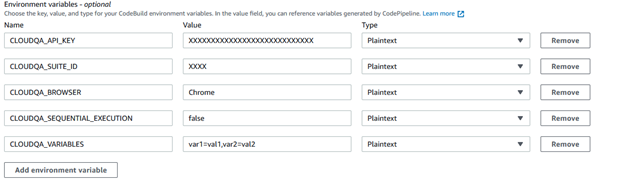
-
Select Done, then save the pipeline.